Flip a switch. Remove every blind spot.
18 AI processors run on every ticket automatically. Summarize, classify, prioritize, and route — no configuration required, just turn them on.
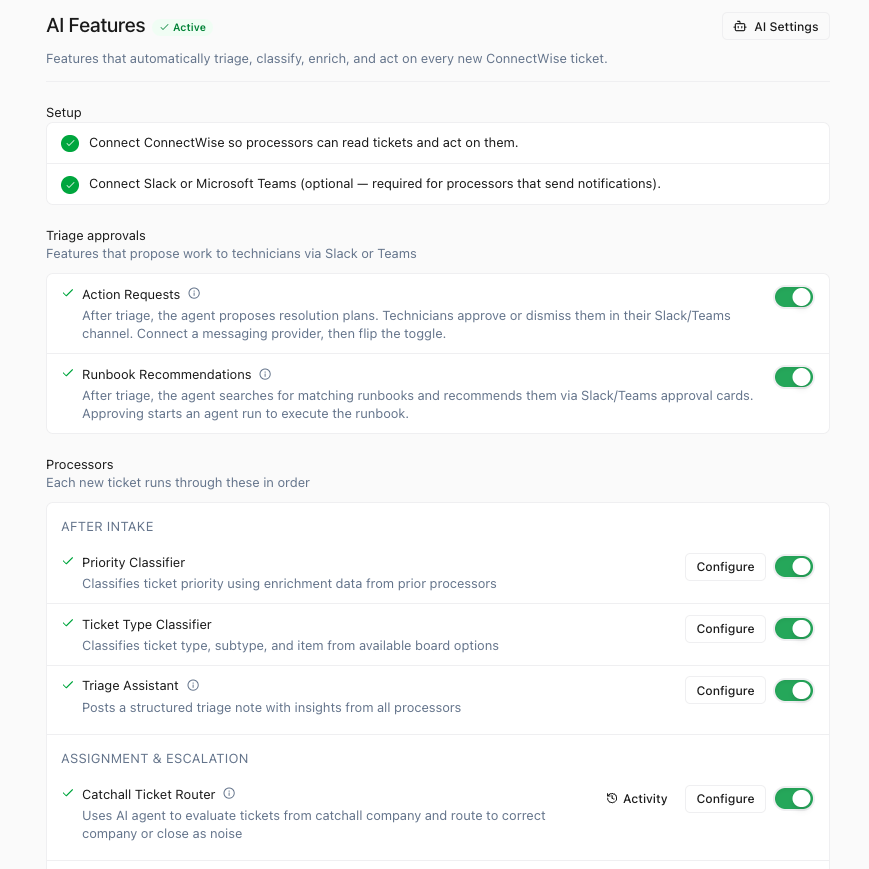
6 phases, 18 processors
From intake to resolution
Intake
Run immediately when a ticket is created
Detects customer frustration, urgency, and emotional tone in communications.
Determines whether a ticket is an issue or a service request.
Enrichment
Add context, classify, and prepare the ticket for triage
Generates a concise summary of the ticket content.
Extracts technical categories and suggests relevant tags.
Extracts persons, devices, applications, and vendors from signal content.
Classifies ticket type, subtype, and item from available board options.
Classifies ticket priority using enrichment data from prior processors.
Evaluates how automatable the ticket is by the AI agent.
Posts a structured triage note with insights from all processors.
Routing
Route and assign tickets to the right place
Evaluates tickets from catchall company and routes to the correct company or closes as noise.
Continuous
Run on every ticket update throughout its lifecycle
Updates the signal description as new messages and notes arrive.
Classifies ticket activities and computes communication quality metrics.
Resolution
Analyze and learn when tickets are resolved
Posts a structured resolution note with service quality insights.
Compares the AI-proposed resolution against what the technician actually did.
Classifies resolved tickets into Category, Service, and Task hierarchy.
Analytics
Scheduled background analysis and notifications
Sends weekly reminders to technicians with gaps in ConnectWise time entries.
Scans in-progress tickets to surface operational health problems.
Sends notifications when KB documentation or automation recommendations are created.
Frequently Asked Questions
Stop triaging tickets by hand.
Let 18 processors handle the grunt work. Every ticket arrives enriched, classified, and ready for action.